Find your Holo in DemonDex
Our starter draft showed 747 points for Frost Spirit. A minute later, the atlas listed the same level at 249. Opening the card detail explained both numbers and showed exactly which copy the game had saved.
Search inside the cards you own
After choosing your starter or opening a pack, remember one exact level name. Open DemonDex & Forge, choose Card Atlas and select Owned. Enter the name in the search box. We entered Frost Spirit after choosing it in the starter draft. The results narrowed to one Rare card with a Holo label.
Select the card to open its detail panel. If you’re trying to find an unfamiliar level, switch the filter to All and try the level name there. A level can appear in the full atlas before you own a copy. Clear the search text when you want to browse the rest of your inventory.
Read one card, line by line
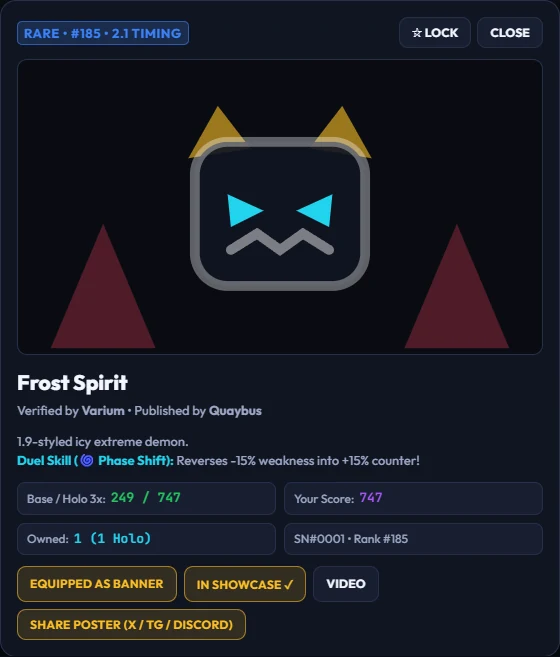
- Base / Holo 3x · 249 / 747
- The atlas showed the base value on the tile. The Holo we picked was worth 249 × 3, which explains the 747 on the draft screen.
- Your Score · 747
- In this test the level contributed 747 points. Compare this number with the copy count below it when reading your own card.
- Owned · 1 (1 Holo)
- One copy in total, and that copy has the foil finish. The number in parentheses is already included in the total.
- SN#0001 · Rank #185
- The serial identifies the copy. The rank places the level on the list. Frost Spirit’s serial was 0001 even though the level occupied position 185 in this snapshot.
Mark a card you want to revisit
Open the card detail and use the star in the upper corner. On our starter, ☆ Lock changed to ★ Locked. The banner and showcase have their own indicators further down the panel. Our starter already displayed Equipped as Banner and In Showcase before we used the star.
Close the panel and select Locked ★. Our result read Frost Spirit★. A different search string produced zero matches, so clear the search field if your starred card disappears. Open the card and press the star again to remove the lock. In our test the button returned to ☆ Lock.
If two cards in a pack have the same name, use the Owned line to check how many copies you have. To compare levels by copy count, switch the atlas sort menu to Sort: Owned Copies. Use a card’s detail panel when you want its Holo count and recorded rank.
Open the arcade and find your card → · Use ranks in a five-card sort